
Most freelancers think “billing automatically” means software that sends invoices for them. That’s the wrong part to automate. The send takes thirty seconds. The hours go into rebuilding what you did, for whom, and how long it took, and that’s where the mistakes and the missed work live.
My position: automate everything up to the send button, then press it yourself. Your records should build the invoice without any retyping, and you should still look at every hourly invoice before it goes out. Fully automatic sending belongs to one narrow case, the fixed monthly retainer. And the best time to set this up is before the first invoice of the new year, not in the middle of a busy March.

What Does It Mean for a Freelance Business to Bill Automatically?
A freelance business bills automatically when the invoice is a byproduct of records you already keep. Each piece of client work exists as a task, the time on that task is tracked as you work, and the client’s rate is already stored. When invoice day comes, the draft assembles itself from those records, and your job is a short review. Nothing gets reconstructed from a calendar, an inbox or memory.
The difference shows up in time and in money. In a FreshBooks survey of 260 U.S. freelancers and small business owners (April 2026), businesses that spend five or more hours a month on invoicing were nearly three times as likely to face cash-flow problems. FreshBooks sells invoicing software and the finding is a correlation, so read it with some salt. Still, the pattern makes sense. When invoicing takes an evening, it gets postponed, and a postponed invoice is a postponed payment.
Should Freelancers Let Software Send Invoices Automatically?
For hourly and project work, no. The amount changes every cycle, and an invoice that sends without a look can carry a wrong rate or a line the client never expected. The client finds the mistake instead of you, and that costs more trust than the review would have cost time.
The review is short when the records are good. You’re checking, not building. Read each line, ask whether it matches what the client would recognize, and fix anything odd before it leaves. Five minutes a client is plenty.
Fixed retainers are the exception. If a client pays the same amount for the same scope every month, a recurring invoice that sends itself is fine, and it’s one less thing to remember. Once the scope or the amount starts moving month to month, it’s no longer a retainer for billing purposes. Put it back on the review list.
What Do You Set Up Once?
You set up the details that never change between invoices, so you never type them again. Do this in one sitting:
- Invoice numbering: a prefix and a starting number, so every invoice gets the next number without you checking the last one.
- Payment terms: the number of days until payment is due, matched to what your agreements say.
- Tax: your default rate, plus any client-specific rate if you bill clients in different places.
- Payment details: how clients pay you, printed on every invoice so nobody has to email and ask.
- Client rates: each client’s hourly rate stored on the client, not in your head.
That last one matters more than it looks. If your rate lives in your head, every invoice is a small chance to undercharge an old client at an old rate. If you’re raising rates in January, update the stored rate on the effective date, and the next invoice handles it for you.
How Does Client Work Turn Into Invoice Lines Without Retyping?
Client work turns into invoice lines without retyping when every piece of work starts as a task and the timer runs on that task. The task name becomes the line description, the tracked time becomes the hours, and the stored rate does the math. That’s the whole idea behind the task-to-invoice workflow: the plan and the bill are the same record.
The habit to build is creating the task before the work starts, including the small stuff. Fifteen-minute calls, quick fixes and “can you take a look” requests are what drop out of memory first. If they never became tasks, no billing setup can bill them, because there’s nothing for the draft to pull in. Once a quarter, an invoice audit will show you how much of that still slips through.
When Should a Freelancer Send Invoices?
Send invoices on one fixed day and treat it like a client meeting. Every other Friday works. So does the first business day of the month. Add an invoice at delivery for project work, and you’re done deciding.
The fixed day matters because late invoices make late payments worse. In the QuickBooks 2026 Small Business Late Payments Report, 59% of U.S. businesses surveyed had invoices overdue by 30 days or more, up from 47% the year before. You can’t control when a client pays. You can control when the clock starts, and an invoice you haven’t sent hasn’t started it.

On invoice day, the review is the only manual step. Open each client’s draft, read the lines, and check that each one reads the way that gets you paid faster: a task name the client recognizes, the hours, the rate. Then send it.
How Should You Handle Late Payments Without Thinking About It?
Decide your follow-up schedule now, before any invoice is late, so chasing a payment is a routine and not a mood. A common pattern is a short, friendly note on the due date, a second note seven days later, and a phone call at fourteen days. Write the two notes once and save them. When the day comes, you send the saved note instead of drafting something tense at 10 p.m.
Check your agreements first. Your payment terms and anything you agreed about late fees set what you can ask for, and that varies by contract and by place.
What Does This Setup Look Like in Aeto?
Aeto handles the parts of this that come before the send button, so it gets one short section here. Invoice settings hold your business details, tax, payment details, payment terms and invoice numbering. Each timer runs on a specific task, so every time slip carries the client, project and task with it. When you’re ready to bill, you pick a client and a billing period, Aeto pulls every unbilled time slip into an invoice draft itemized by task, and you review, adjust and send.
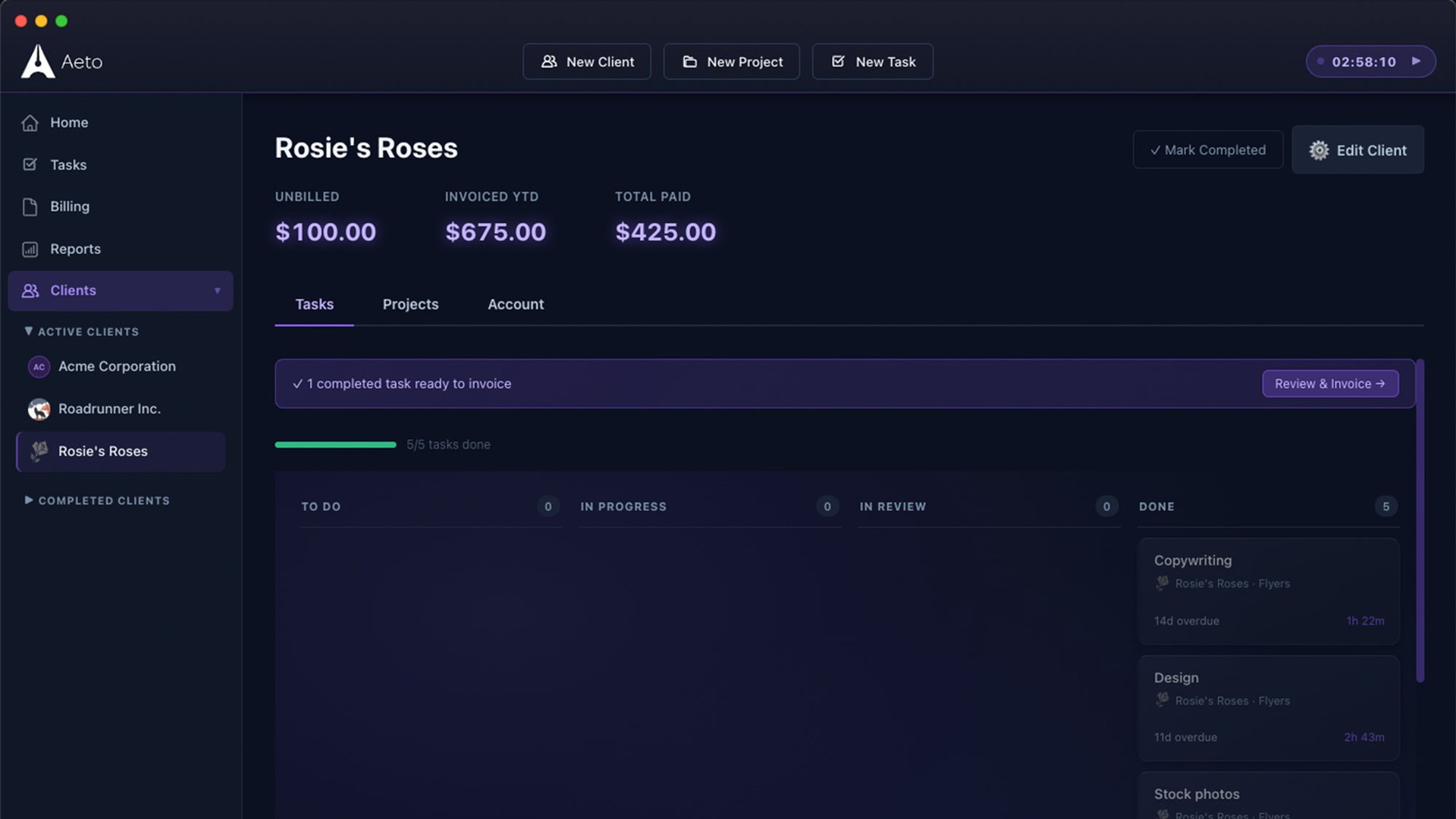
Each client screen shows what’s unbilled, invoiced and paid, and a banner flags completed work that’s ready to invoice. The calendar shows invoice due dates next to task deadlines and flags overdue invoices, which covers the follow-up schedule above. There are limits worth knowing. Aeto doesn’t sync with QuickBooks or Xero (reports export to CSV for your bookkeeper), and it has no proposals, contracts or team accounts. If those are the parts you need automated, you’ll want a different tool or a second one.
The One-Hour Billing Setup: Do It Before January
One hour in December covers it.
- Set your invoice numbering, payment terms, tax rate and payment details in whatever tool you use.
- Enter each active client’s current rate, and the new rate with its effective date if you’re raising it.
- Pick your invoice day and put it on your calendar as a repeating event for all of next year.
- Write your two follow-up notes, the due-date one and the seven-day one, and save them as templates.
- Starting the first working day of January, create a task before any client work and run the timer on it.
Then watch your first invoice day in January. If the review takes minutes and nothing surprises you, the setup works. If you find yourself digging through email to fill in a line, look at where that work started without a task.
Start a 30-day free trial. No credit card required.
Frequently Asked Questions
What does it mean for a freelancer to bill automatically?
It means the invoice draft builds itself from records you already keep, such as tasks, tracked time and each client’s rate, so nothing gets retyped or reconstructed from memory. You still review the draft and send it. The automation sits in the record-keeping, which is where most freelance billing errors and missed hours come from.
Should freelancers use recurring invoices that send automatically?
Only for fixed retainers, where the client pays the same amount for the same scope every month. For hourly or project work, the amount changes every cycle, and an invoice that sends without a review can ship a wrong rate, a missing task or a line the client didn’t expect. A short review before sending catches those mistakes before the client does.
How often should a freelancer send invoices?
Pick one fixed day and keep it, such as every other Friday or the first business day of the month, plus an invoice at delivery for project-based work. A fixed day turns billing into a routine instead of a decision, and clients learn when your invoice will arrive.
How long should it take to send a freelance invoice?
If your time is tracked against tasks and your invoice settings are configured, a review of the draft should take a few minutes per client. If invoicing takes an hour or more, you’re probably rebuilding the work from your calendar, inbox and memory, which is the step a billing setup is meant to remove.
How should freelancers follow up on late invoices?
Decide the schedule before any invoice is late, so following up is a routine and not a judgment call. A common pattern is a short, friendly note on the due date, a second note seven days later, and a phone call at fourteen days. Check your agreement first, since its payment terms set what you can ask for.