Most freelance developers already work on a Kanban board. Often it’s several: one client’s Jira, another client’s GitHub Projects, and a third client’s Linear workspace you log into twice a week. Every one of those boards belongs to someone else. None of them shows your whole week, and none of them knows what you’re going to invoice.
You need one board of your own that holds every client, and it’s the board you should bill from. That holds even when each client already has you working in their tracker. The client’s board is a record of their project. Yours is the record of your business. If you’ve been treating the client’s tickets as your billing record, some of your work is going unbilled.

What Is a Kanban Board for Freelancers?
A Kanban board for freelancers is a visual list of client work split into columns by stage, where each card is a task you can bill for and you move it left to right as the work progresses. The idea comes from Toyota’s factory floors, where kanban (Japanese for “signboard”) cards signaled what work was ready to start. Software teams adopted it to see work in flight. A freelancer’s board differs from a team’s board in one important way: a team board has many people and one project, while yours has one person and many clients. So the questions a freelancer’s board needs to answer are different. A team asks “who’s working on this?” You need to ask “what am I committed to across every client, and which of it have I billed?” A board set up to answer that second question is what turns project management into billing.
Why Shouldn’t Freelancers Bill From the Client’s Jira Board?
You shouldn’t bill from a client’s tracker because it only holds the client’s tickets, and a lot of billable work never becomes a ticket. Jira is everywhere: in the Stack Overflow 2025 Developer Survey, 46.4% of respondents said they use it as a code documentation and collaboration tool. So it’s tempting to treat those tickets as your timesheet. But think about what isn’t in there: the kickoff call, the code review you did for their in-house developer, the afternoon you spent getting their staging environment to build, and the “quick question” in Slack that turned into an hour of reading logs. None of that has a ticket number. The client’s board is also organized around their sprint, and your access usually disappears the day the contract ends, right around the time you might want to check what you billed.
Should You Use One Kanban Board or One Board Per Client?
Use one board for every client. You only have one pair of hands, and only a single board shows how much you’ve actually promised. With a board per client, each one looks manageable on its own. Client A has three cards in To Do. Client B has four. Client C has two. Nothing looks alarming until Thursday, when you realize all nine are due next week. Put every card on one board, label each with its client and project, and the conflict shows up while you can still do something about it, like moving a deadline or saying no to a new request. This matters for more developers than you might think: 13.9% of the developers who answered the Stack Overflow 2025 survey work as independent contractors, freelancers, or self-employed. When it’s time to invoice, filter the board by client. You get the per-client view on demand without losing the whole picture the rest of the week.

What Columns Should a Freelancer’s Kanban Board Have?
A freelancer’s board needs four columns: To Do, In Progress, In Review, and Done. To Do holds work that’s agreed and ready to start. In Progress holds what you’re working on right now. In Review holds work that’s waiting on the client, such as a pull request they need to approve or a staging build they need to test. Done holds finished work, and on a freelancer’s board, Done means “ready to bill.” Resist the urge to add more. Backlog, Blocked, QA, and Deployed columns make sense when a team needs to hand work between people. For one person, every extra column is another place for a card to sit unnoticed. In Review is the column to watch most closely, because work waiting on a client still took your time. On an hourly project, bill those hours on your normal schedule. Don’t hold them back until the client gets around to approving.
How Should You Name a Card So It Becomes an Invoice Line?
Name each card the way you’d want it to read on the invoice, because on a board that feeds billing, the card name becomes the line item. “PROJ-1423” means nothing to the person approving your invoice. “Dev work” invites the question “what dev work?” A card called “Fix checkout webhook retries” tells the client exactly what they paid for. If you want the link back to their tracker, put the ticket number in the card’s description, not the title. Size each card so it’s something the client would recognize on a bill, roughly a few hours to a couple of days of work. Anything bigger hides too much inside one line. Anything smaller turns your invoice into a commit log. Clear task-level lines are also what gets invoices paid faster, because they leave the client fewer reasons to ask questions.
How Many Tasks Should a Freelancer Have In Progress at Once?
Keep no more than two cards in In Progress at any time. Teams use work-in-progress limits to stop work piling up between people. A freelancer has a different reason: every card in progress is a task you might be tracking time against, and every extra one makes it easier to log an hour to the wrong client or forget to log it at all. Two cards leaves room for your main task plus one interruption, like the urgent fix a different client needs before lunch. When a third thing comes up, something has to move first, either back to To Do or forward to In Review. That small bit of friction is the point. It forces you to stop one timer before you start another, which is the habit that keeps your time tracking accurate without much effort.
How Does a Kanban Board Connect to Time Tracking and Invoicing?
A board connects to billing when the timer runs on the card and the Done column is where invoices start. Start your timer on the specific card you’re working on, so the hours carry the client, project, and task with them. When a card moves to Done, its hours are ready to bill. On your billing day, pull everything in Done that hasn’t been invoiced yet, client by client. That’s the full task-to-invoice workflow, and the board is what holds it together. If your board, your timer, and your invoices live in three separate tools, you’re copying the board into the other two every week. Each copy is a chance to drop something, and the quarterly invoice audit is how you find out how much fell through. Trello or a whiteboard works fine for the board itself. The question is how much retyping sits between the board and the bill.
How Does Kanban Work in Aeto?
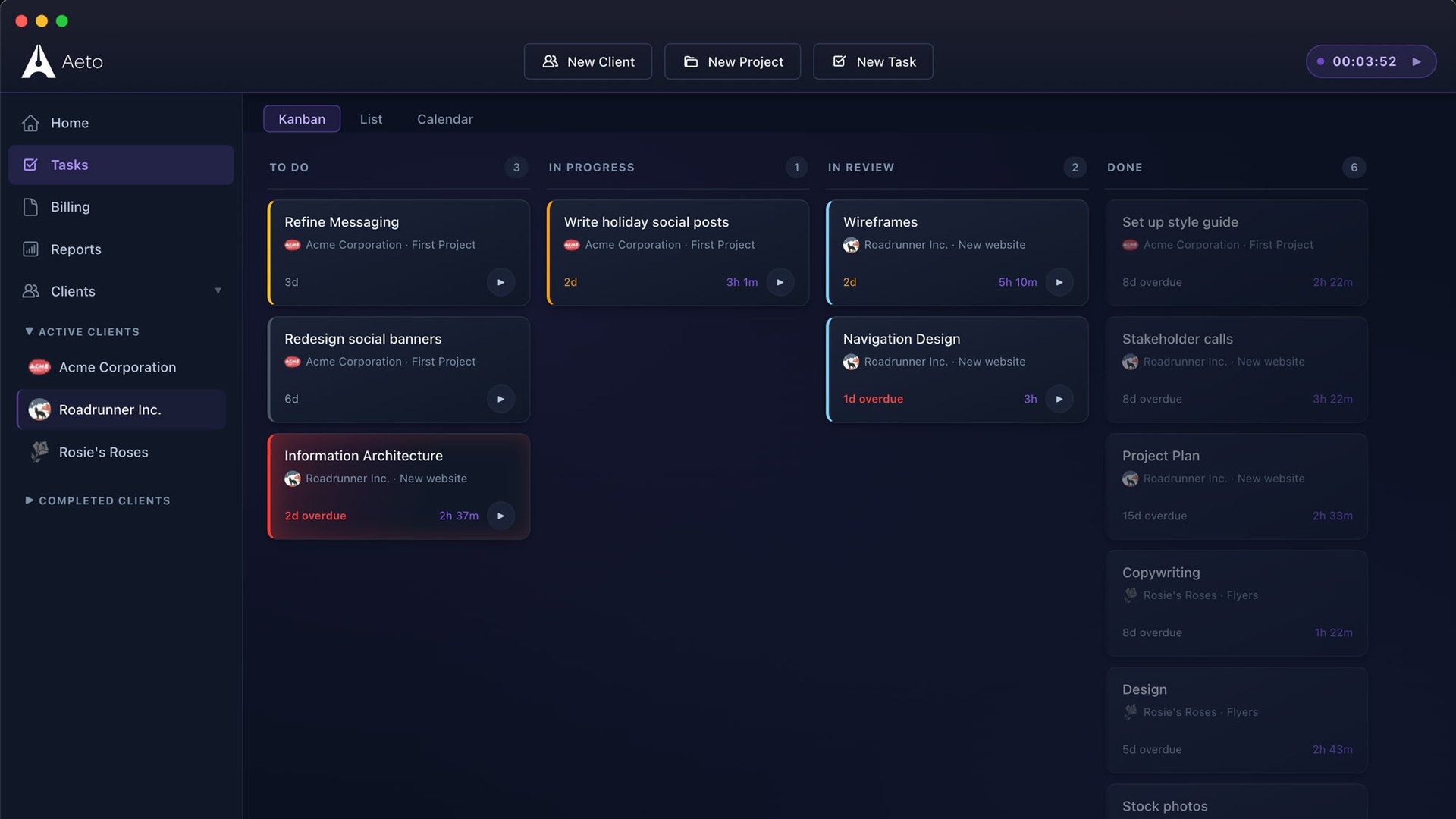
Aeto is built around a Kanban board that feeds invoices, so it gets one short section here. The board has the same four columns (To Do, In Progress, In Review, Done) and shows tasks across all your clients and projects at once. Each client’s page has its own board when you want just that client’s view. Every card has a timer, so the time you track is already attached to the client, project, and task. On hourly projects, Aeto pulls unbilled time into an invoice draft, itemized by task. To be upfront about the limits for developers: Aeto has no GitHub, GitLab, Jira, or Linear integration, so cards don’t sync from your client’s tracker. You create them yourself, which takes a few seconds each. There’s no API or CLI for timers, and it’s built for one person, not a team. The freelance developers page covers the rest.
Try It This Week: The One-Board Week
You don’t need new software to test this. A whiteboard or a free Trello board will do for one week.
- Make one board with four columns: To Do, In Progress, In Review, Done.
- Add a card for every open piece of work across every client, named the way it would read on an invoice. Copy over anything that lives only in a client’s tracker.
- For the next five days, create a card before you start anything, including calls and code reviews, and keep no more than two cards in In Progress.
- On Friday, compare the cards in Done with the tickets you closed in your clients’ trackers.
The cards that show up on your board but not in any client’s tracker are the work you’d have missed. Look at what they have in common. They’re usually the calls, the reviews, and the setup work, which is exactly the work clients don’t think to ticket.
Start a 30-day free trial. No credit card required.
Frequently Asked Questions
What columns should a freelancer’s Kanban board have?
Four is enough. To Do holds work that’s ready to start, In Progress holds what you’re working on right now, In Review holds work waiting on the client, and Done holds finished work that’s ready to bill. Extra columns like Backlog, Blocked, or QA make sense for teams, but for one person they mostly add places for cards to sit unnoticed.
Should freelancers use one Kanban board or one board per client?
Use one board for every client, with each card labeled by client and project. You only have one pair of hands, so a single board shows your real workload and makes conflicts between clients visible before a deadline slips. When it’s time to invoice, filter the board by client. Separate boards per client hide how much you’ve committed to in total.
Can freelance developers bill from a client’s Jira or GitHub board?
You can, but you’ll miss billable work. A client’s tracker holds the client’s tickets, which leaves out calls, code reviews, environment setup, and the investigation behind a “quick question.” It’s also organized around the client’s sprint, not your invoice, and your access usually ends when the contract does. Keep a card on your own board for each piece of work, and paste the ticket number into it if you want the link.
How many tasks should a freelancer have in progress at once?
Two at most. Every card in progress is a task you might be tracking time against, and every extra one makes it easier to log an hour to the wrong client or forget to log it at all. A limit of two leaves room for one main task and one interruption, such as an urgent fix for another client.
Is Trello or a whiteboard good enough for freelance project management?
For the board itself, yes. Trello, GitHub Projects, Notion, or sticky notes on a wall can all hold four columns of cards. The weak spot is the handoff afterward. If your time lives in a separate tracker and your invoice is typed by hand, you’re copying the board into two other places every week, and small items fall out along the way.